Ask AI about your responses on a new two column dashboard
The dashboard now has two columns, and you can ask AI about your responses right on it. You get a short answer on the spot, with the full analysis one click away in AI Analytics.
The new layout, Your surveys and Suggested next step are available on all plans. Ask AI is available on all plans, except for stores that installed SEA Survey before September 5, 2025. On the Free and Starter plans, you get 3 free questions.
What changed
Two columns instead of one. The left column holds Quickstart while you set up the app. Below it come Overview with Ask AI, then Recent answers. The right column holds the app status card, Your surveys, Suggested next step and Helpdesk.
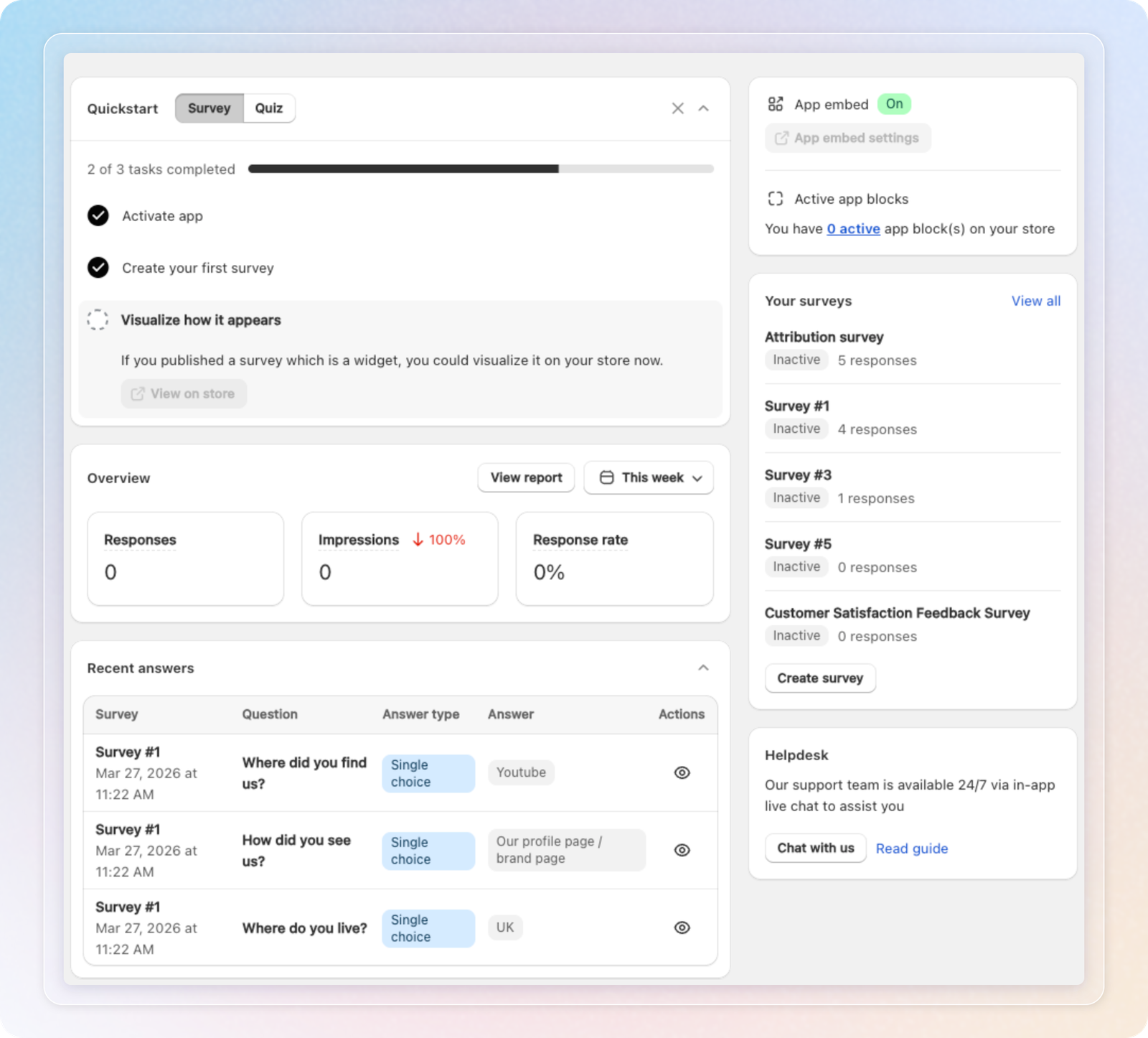
Quickstart shrinks when you finish. Once you finish every step, Quickstart moves to the right column as a one line card. It shows a badge such as "3/3 completed". Click the arrow to open it again.
Your surveys replaces Most answered surveys. The new card lists your 5 most answered surveys, up from 3. Each one shows its number of responses and an Active or Inactive label. Click a survey name to open it. The label is no longer a switch. To turn a survey on or off, click View all. Click Create survey to start a new one. The card stays hidden while you have no survey.
AI builds your first survey. While you have no survey, the Create your first survey step shows Let AI build your first survey. Click Create with AI to get a draft. Click Or start from a template to pick a template instead.
Ask AI on the dashboard. Ask AI sits inside Overview, below the three numbers. Type a question about your customers' answers, or click a suggested question. AI reads the selected survey's responses from the last 30 days. The answer has one main sentence and up to three bullet points.
Suggestions from your own questions. You see up to three suggested questions, based on the questions in your survey. For example, Top channels for "How did you hear about us?" or Why low ratings for a star rating question. If there are fewer than three, the app adds Summarize last 30 days.
A short answer and a full one. Click See full answer to open the same conversation in AI Analytics. AI writes both versions in one go, so the full answer costs nothing extra. Type your next question below the answer. AI Analytics opens with it in the message field, ready for you to send. History keeps your 10 most recent conversations and shares them with AI Analytics. Opening one again costs nothing.
What a question costs. On the Free and Starter plans, you get 3 free questions, once per store. A free question needs at least 5 responses in the last 30 days. A survey with fewer than 5 responses uses tokens, even with free questions left. A free question reads up to the 500 newest responses. After your 3 free questions, or on other plans, 1 response read costs 1 token. Ask AI uses the same token balance as AI Analytics. You only pay when AI answers.
A suggested next step. Once your store has 50 responses, a card suggests one integration to set up. It picks the email app turned on in your live theme: Klaviyo, Omnisend, Mailchimp or ActiveCampaign, in that order. With no email app left to suggest, it suggests connecting Claude. Click the X to stop a suggestion for good.
Close the locked segments banner. A plan downgrade can lock some of your custom segments. The banner that tells you now has an X. It shows again the next time you open the app.
How to use: Open SEA Survey to land on the dashboard. If two or more surveys have responses, choose one in Ask AI. Click a suggested question. Read the short answer. Then click See full answer for the full analysis.
Things to know
- Ask AI shows once your store has at least 25 responses in total and a survey with responses.
- If the selected survey has no responses in the last 30 days, the app locks the question field.
- If you don't have enough tokens, asking a question opens the token packs.
See Dashboard for the full walkthrough of every card.