Point of Sale (POS)
Run your survey right on a POS device. Staff can prompt customers to answer while they're checking out or looking up their profile in-store, not only online.
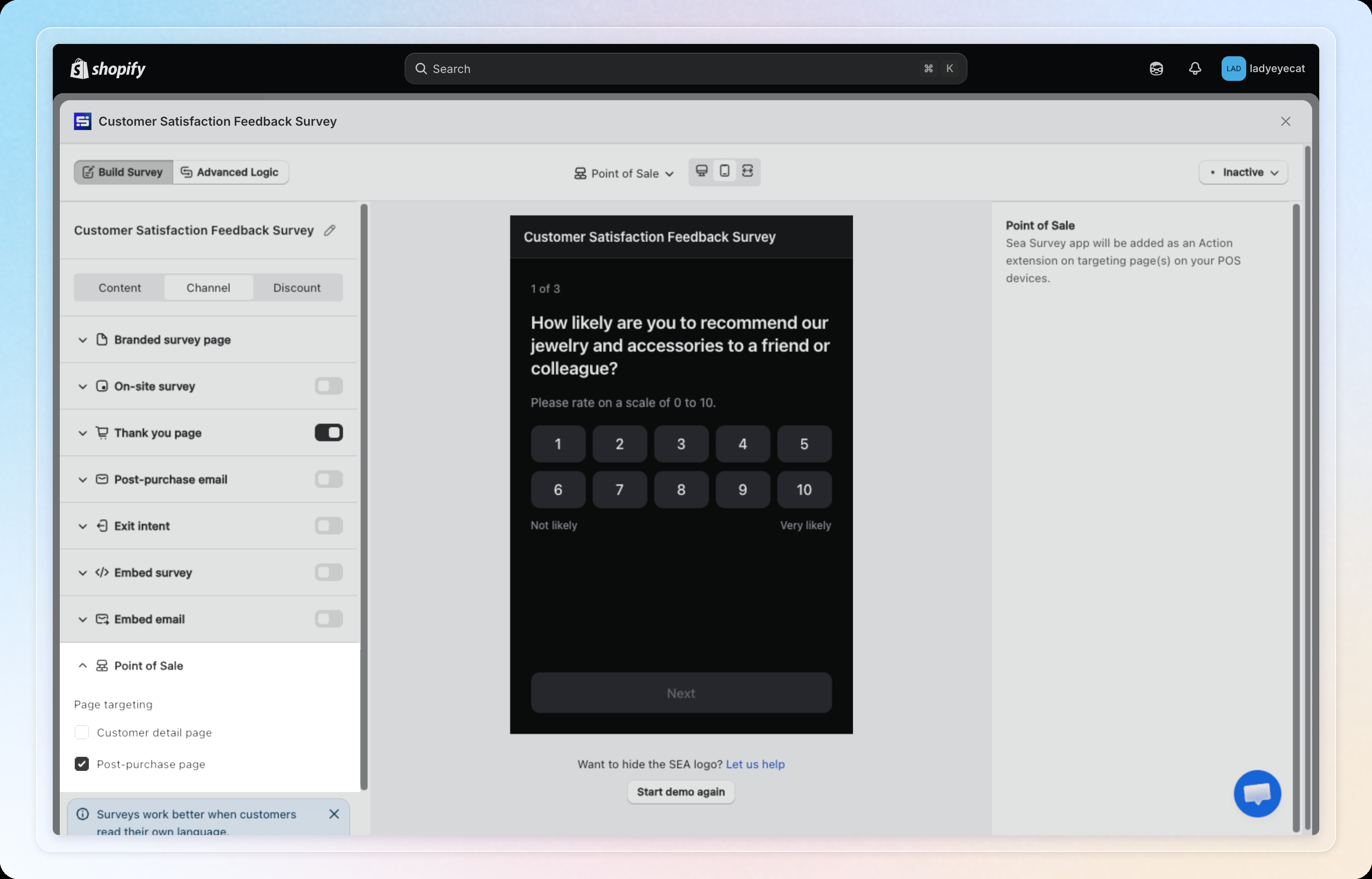
Enabling this channel adds a POS extension called Customer Survey. You don't install anything separately on the POS device. Once you turn on the toggle below and save, Customer Survey appears automatically in the POS action menu. It shows up on any device that's signed in to your store through the Shopify POS app.
Prerequisites
- Available on all plans
- A survey with at least one question, and no question of an unsupported type (see the warning below)
Steps
Step 1: Open the Channel tab
In the survey editor, click the Channel tab, then select Point of Sale from the channel list.
Step 2: Turn on the channel
Turn on the toggle for Point of Sale.
The toggle is disabled (greyed out) if your survey has no questions yet, or if it contains an Upload question. POS doesn't support file or photo uploads. Hovering over the disabled toggle shows which question(s) to remove. Once you remove them, the toggle re-enables automatically.
Step 3: Choose page targeting
Under Page targeting, choose where staff can launch the survey on a POS device.
- Post-purchase page: turned on by default. Staff tap Customer Survey in the action menu after completing an order to open the survey.
- Customer detail page: the survey opens automatically when staff open a customer's profile. Staff don't need to tap anything to launch it.
You can turn on one or both options.
Step 4: Save your survey
Click Save. Staff can now open Customer Survey from the selected POS page(s) on any POS device.
How it works on POS
Post-purchase page
After a sale completes, staff tap Customer Survey in the POS action menu to open the survey. The customer answers and submits their response right on the screen.
Customer detail page
The survey pops up automatically when staff open a customer's profile on the POS device. Staff don't need to tap anything to launch it.
Question types and features
Both flows support the same question types as your other channels:
- Single choice, Multiple choice, Star rating, Satisfaction
- Number scale (NPS), Short answer, Email, Date, Consent email
Advanced Logic works on POS too, the same as on your other channels.
Thank you page and discount codes
If your survey rewards customers with a discount code, the POS thank you screen displays the code in large text. This makes it easy for staff to read the code aloud, or type it in for the customer.
Limitations
POS has a few feature limits compared to your other channels.
- Upload questions aren't supported. POS doesn't have a file picker. A survey with an Upload question can't turn on this channel until you remove it.
- Advanced Logic actions that redirect the customer or send them an email don't run on POS.
- The discount code on the thank you screen doesn't have a Copy code button. Staff need to read or type it out for the customer.
Tips
- Preview shows a dark, POS-styled version of your survey, so you can check how questions read on a POS screen.
- Combine with other channels (like Branded survey page) if you also want customers to complete it online. Page targeting for POS is independent of your other channel settings.